
Model Catalog
Weaver's model catalog is deployment-specific. Use the Console or SDK at runtime instead of relying on a static model list.
Find an Available Model
The Console's Supported Models page shows models available to the current Organization, including availability, context information, and prices for training, input, cached input, and output tokens.
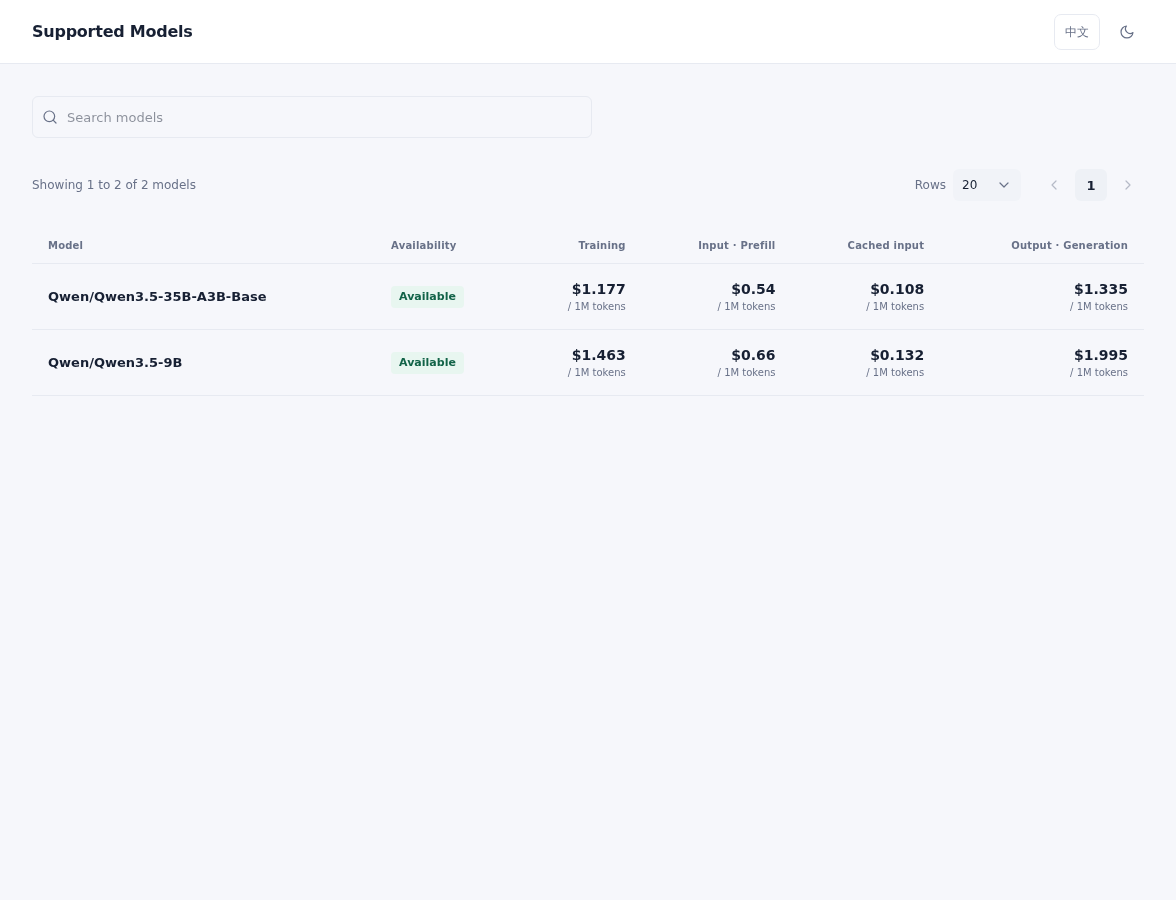
Copy the model name from the catalog and compare token prices before training.
The SDK applies the same visibility and availability rules:
from weaver import ServiceClient

with ServiceClient(organization="research") as client:
    models = client.list_supported_models()
config = client.get_supported_model_config(models[0]) if models else Nonelist_supported_models() returns currently usable model names. get_supported_model_config() returns the information needed to select that model.
WARNING
Always pass the exact model name returned by the catalog. Available models can differ between Organizations and environments.
Training Modes
LoRA
LoRA is the default and is usually the best starting point for fast experiments and frequent updates:
training_client = service_client.create_model(
    base_model="<model-from-catalog>",
    training_mode="lora",
    lora_config=types.LoraConfig(
        rank=32,
        train_attn=True,
        train_mlp=True,
        train_unembed=True,
    ),
)Full Fine-Tuning
Use full fine-tuning when LoRA capacity is insufficient and the selected model supports it:
training_client = service_client.create_model(
    base_model="<model-from-catalog>",
    training_mode="full_ft",
)Context Length
Context length is part of the catalog model identity. Some deployments expose a long-context variant with a suffix such as :<max_seq_len>; others include it in the base model name. Do not invent a suffix—copy the exact catalog value.
Weaver rejects a training or sampling request whose effective token length exceeds that model's configured max_seq_len. Keep room for generated tokens when setting sampling limits.
Performance Tiers
performance_tier selects a throughput and price tier independently from the model name:
training_client = service_client.create_model(
    base_model="<model-from-catalog>",
    performance_tier="fast",
)Common values are normal, fast, and flash; availability is model- and deployment-specific. Higher tiers generally provide more throughput at proportionally higher cost.
Selection Guidance
- Start with a featured, available smaller model and default LoRA while validating data and loss masks.
- Check all four token prices before a sampling-heavy workload; output and prefill are billed separately.
- Choose full fine-tuning, long context, or a higher performance tier only when the experiment needs it.
Next Steps
- Training and Sampling: create a Training Run and start training.
- Usage, Billing, and Quota: understand token prices and quota.
- Saving and Loading: save training state and sampler weights.